
System section
Cluster
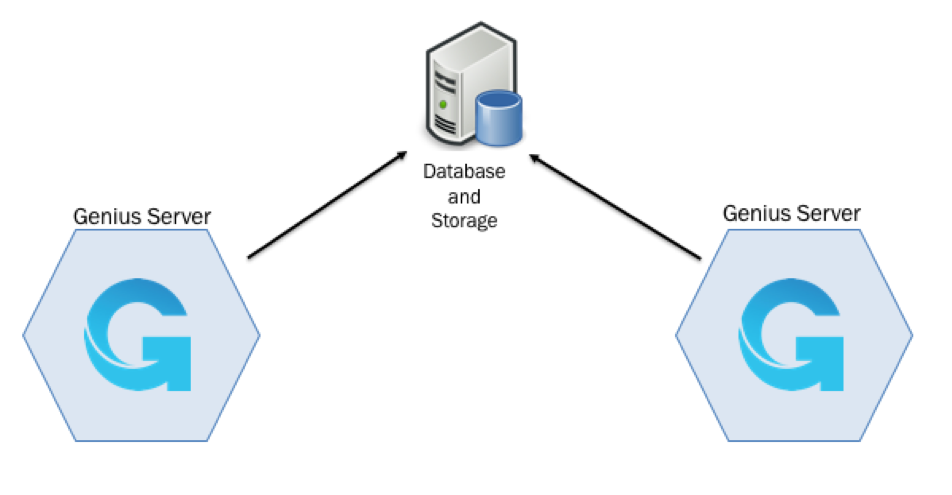
A Genius Server Cluster is a set of nodes on which the Genius Server is installed. They are connected to each other through the network. All nodes appear as a single installation and all components are resources dedicated to the operation of the set. They share the same database and storage.
The Genius Server Cluster is a very high-performance service: Instead of burdening on a single standalone machine, it distributes the workload of each engine (e.g. BPM, MPS, DMS) among nodes.
The Genius Server Cluster is a Failover Cluster: the nodes are constantly monitored and when a node stops working, another node takes charge of its workload. The aim is to ensure a continuous service granting high availability thanks to the fault tolerance of the cluster system as a result of the redundancy of equipment.
Advantages of the Genius Server Cluster are:
scalability in high working load conditions,
scalability with a large fleet of MFPs,
high reliability and fault tolerance,
node specialization (BPM, monitoring, printing, barcode)and
support for installations in different sites.
Cluster
Server in cloud [Advanced]: if checked, the cloud configuration of the Genius Server is enabled. For further details, refer to the Server in Cloud chapter.
Multitenant [Advanced]: if checked, the cluster supports multiple tenants.
Cluster name: the name of the cluster.
Node name: the name of the node in the cluster.
Cluster node address: the cluster IP Address or FQDN. When using multiple servers in a cluster environment all adresses or FQDNs of Genius Server nodes must be entered here. Use a separate line for each.
Base cluster file path [Advanced]: the path of the folder where cluster files are stored. To verify the path, press the Check button. If the folder does not exist, the field becomes red.
Heart beat interval [Advanced]: the number of milliseconds after which a heartbeat is sent by a cluster node to the database to update it on its availability.
Alive threshold interval [Advanced]: the number of milliseconds after which a node is considered not reachable anymore.
Migrations
Migration enabled: if checked, the data migration among cluster nodes is enabled.
Migration execution cron: a cron expression to schedule when to execute the migration. To modify its cron expression, press the Edit button, enter the expression and then press Save. For further details about cron expression, refer to the Cron Trigger Tutorial (Quartz Cron) section.
Migration threshold interval: the number of milliseconds after which a node is ready for migration.
CORE node engines
Printing engine: if checked, the printing engine is enabled on the current node of the cluster.
Email engine: if checked, the email engine is enabled on the current node of the cluster.
Reporting engine: if checked, the reporting engine is enabled on the current node of the cluster.
Scheduler engine: if checked, the scheduler engine is enabled on the current node of the cluster.
DMS engine: if checked, the DMS engine is enabled on the current node of the cluster.
BPM node engines
BPM engine: if checked, the BPM engine is enabled on the current node of the cluster.
BPM task monitor engine: if checked, the BPM tasks monitoring is enabled on the current node of the cluster.
BPM instance monitor engine: if checked, the BPM instances monitoring is enabled on the current node of the cluster.
BPM purge instances engine: if checked, the BPM instances purge is enabled on the current node of the cluster.
BPM starter engine: if checked, the BPM definition starter is enabled on the current node of the cluster.
Monitoring node engines
Monitoring supply items engine: if checked, the device supply items monitoring is enabled on the current node of the cluster.
Monitoring status engine: if checked, the device status monitoring is enabled on the current node of the cluster.
Monitoring counters engine: if checked, the device counters monitoring is enabled on the current node of the cluster.
Monitoring messages engine: if checked, the device messages monitoring is enabled on the current node of the cluster.
Backend node engines
Accounting ETL engine: if checked, the accounting data warehouse is enabled on the current node of the cluster.
Printing print job ETL engine: if checked, the printing data warehouse is enabled on the current node of the cluster.
Bulk detection engine: if checked, the bulk detection is enabled on the current node of the cluster.
Migrations engine: if checked, migrations are enabled on the current node of the cluster.
Email purge engine: if checked, the email purge is enabled on the current node of the cluster.
Identity cache delete engine: if checked, the deletion of cached identities is enabled on the current node of the cluster.
Monitoring clean locks engine: if checked, the current node verifies if device sessions are closed and devices are unlocked.
Extension engine enabled: if checked, the current node integrates itself with a customer specific engine.
Async Jobs Engines Configuration
Whatchdog interval [Advanced]: the number of milliseconds after which the watchdog starts the pending asynchronous jobs (Abbyy, tesseract and pdf builder jobs).
Number of jobs per iteration [Advanced]: the maximum number of pending started jobs that each watchdog can execute simultaneously.
Abbyy engine: if checked, the Abbyy job execution (OCR) is enabled on the current node of the cluster.
Aspose engine [Advanced]: if checked, the Aspose job execution (PDF conversion) is enabled on the current node of the cluster.
Tesseract engine: if checked, the Tesseract job execution (OCR) is enabled on the current node of the cluster.
PDF builder: if checked, the Pdf Builder job execution (PDF conversion) is enabled on the current node of the cluster.
[Advanced] Zone Watchdog
Delay time: the timeout in seconds of a remote zone connection (zone filesystem).
Free space check: if checked, the free memory space in the zone storage is verified.
Free space ERROR limit: if Free space check is enabled, an ERROR log message is added to the Event Protocol (Conf) system when the available space is lower than the specified threshold.
Free space WARNING limit: if Free space check is enabled, a WARNING log message is added to the Event Protocol (Conf) system when the available space is lower than the specified threshold.
Zone file age: the age of the files stored in a zone before deletion in hours.
[Advanced] Advanced
Shared network: if checked, the cluster nodes share the same network.
Enable Encryption: if this is checked, encryption is enabled. The default is true.
Encryption Salt: the salt has to be the same for Genius Server and Genius Relay. If the salt or the cluster secret or both change, the Genius Server needs to be available after restart, befor the Genius Relay is started. So wait until the Genius Server is reachable before turning the Genius Relay back on.
Cluster secret: a password shared among cluster nodes to establish a communication between each other and with the Genius Relay. Needs to be the same on Genius Server and Genius Relay. If the salt or the cluster secret or both change, the Genius Relay will push the new credentials on Hazelcast cluster reconnection.
Cluster port: the port where cluster nodes communicate between each other and with the Genius Relays using Hazelcast (Hazelcast Overview). By default, it is 5701.
Cluster port count: the range of ports where communications can be established.
Cluster port auto increment: this setting needs to be checked if two or more Hazelcast members are to be installed on the same virtual machine on different Hazelcast ports (5701, 5702, etc.). Per default the setting is turned off, which results in Hazelcast only trying to connect to port 5701. With the setting turned off, Hazelcast will not try the other Hazelcast ports in range, only 5701.
Cluster pool size: the size of the pool to handle communications.
Cluster queue capacity: the capacity of the queue where communications wait to be established.
Cluster connection timeout seconds: the number of seconds after which an other attempt to connect to a cluster node is performed.
Do not forget to click on Save to save the changes. When everything in the config tool is configured, the Genius Server needs to be restarted.